|
Once you’ve
taken these simple steps, every time you drive now, your car
could easily pay for itself!
Remember,
you don’t have to do any driving out of your normal cycle and
you won’t be delivering anything or transporting any passengers.
No, once
you’ve gone through these few simple steps that won’t cost you
more than a few bucks and about twenty minutes to set up, checks
will arrive in the mail to pay for the gas it cost you to do
that driving… and probably a little extra too!
All will
become clear as we go. For now, please just follow these basic
instructions.
So turn that
key and let’s go…
Quick Start
Preparations
I’m sure
you’re now as excited as I was about getting started with this
amazing opportunity, so before we get going, I thought you’d
like to make some preparations so you can get cracking right
away when we get to the instructions stage…
Don’t be
scared off because I’m a technophobe too, but we’re going to tap
a few simple keys on a computer for the set-up stage ONLY.
We are not
doing any Internet marketing here because it’s too much like
hard work for me…
Nobody likes
hard work. I don’t want to and/or can’t, make a website, sell,
write ads, create products, run a business. But, you can get a
free ride on the back of people who CAN.
What we’re
going to do is tap into the resources available on the Internet
and unleash them in the real world! This is incredibly
powerful and an untapped market.
I’m no
Internet expert- I’m only just figuring out email! This computer
illiteracy is what led me to create this opportunity actually…
So relax!
Although we’re going to set things up from a computer on the
Internet, this isn’t how we’re going to actually pull this off-
that comes just by having conversations.
You don’t
actually need a computer of your own, just access to one with an
Internet connection. My computer was actually broken when I did
this, so I went to an “Internet café” where you can use one of
theirs. You could also use a library.
We only need
a one-time use of one for around twenty minutes using the simple
websites I’m going to show you later. It’s purely for set up.
So the first
preparation you need to have at least access to the Internet for
a brief period to set up.
Your Little
Black Book
Okay, take a
pen and paper.
Make a list
of the places you regularly drive to and from and places you
park, or could park, for long periods of time.
If it’s just
to and from work, that’s fine, but try to think of any
particulars about the places you go and most importantly, what
kind of people would see your car.
Maybe you
park at/frequent a golf club? = golf enthusiasts see your car.
Maybe you
park outside a hospital? = ill/elderly people see your car.
Maybe
there’s a particular issue in your town?
Maybe
there’s a ‘hot topic’ all over the country at the moment?
TIP: If you
find yourself stuck at this stage don’t worry. Here’s the
solution:
Go about
your weekly business as usual only this time think about people
who’d see your car.
Aladdin’s
Cave
Alright, now
you’ll need that one-time access to the Internet I told you
about. If you have a computer ‘online’ then great, otherwise
head down to the library or ‘Cyber Café’.
Okay, so
you’ve reached the next step and you’re sitting in front of a
computer with an Internet connection. Don’t worry about a thing;
computers aren’t exactly my specialty either!
We only need
to be able to use a couple of really simple websites though and
we won’t be on the computer more than twenty minutes… maybe
less, so hang in there my fellow technophobe!!
If you’re a
keen entrepreneur, you may have already ‘dabbled’ once or twice
in making money online. If so, you’ll have seen it’s not as easy
as all the hyped-up advertising says it is!
You have to
go to all the trouble of building an expensive website, have it
“hosted” and if that wasn’t enough time and money spent, you
have to then play all sorts of games online getting people to
visit the blasted thing!
In short,
very few people can make it work; I should know because I was
one of those failures…
Lateral
thinking can render some amazing results. Little did I know it
at the time, but approaching a problem as an ignorant ‘outsider’
has revealed such an unbelievably simple and lucrative
opportunity ANYONE can follow very quickly and simply.
And yes,
that’s without having a website, a product or getting involved
in all the usual Internet ‘mumbo-jumbo’.
Even a
‘bright-spark’ internet-whiz would NEVER have discovered this,
so I still have to keep pinching myself to believe the fact I’ve
beaten all those ‘dot-com nerds’ hands down!
With
hindsight it just seems like everyone’s getting bogged down with
all the technical jargon and being intimidated by the Internet…
and rightly so, because doing things the way all the ‘experts’
say is a real headache!
Sometimes
people just can’t see the wood for the trees…
Anyway, take
a deep breath and let’s get to it. We’re about to enter
‘cyberspace’ but don’t be daunted! We’re not doing anything
complicated and I’m holding your hand all the way. It’s just a
simple question of following my simple instructions one at a
time.
The first
time you go through this it may seem to go on a bit, BUT it’s
like anything; after you’ve done it once or twice you’ll be
doing it with you eyes closed. Okay…?
Alright. Go
to
www.clickbank.com
and this is what you’ll see…
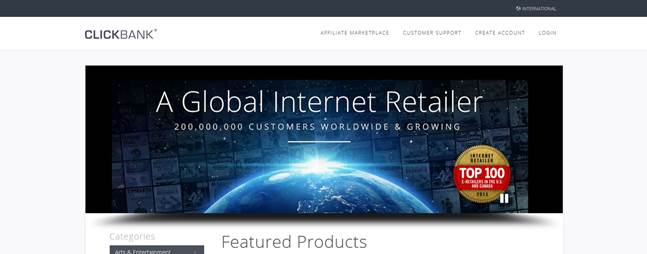
This is
Clickbank. It’s the "secret base" where all the Free Gas report
are stored! Note, this is not my website. So let’s look at what
we do next…
In the
top-right corner you’ll see this “Create account” button:

Click on it
using your mouse and you’ll see this below. STOP! Remember: we
are NOT doing any Internet marketing or getting involved in all
the online techie nonsense! And no selling. We’re just using
this resource for the real world…

Complete
this registration form so your checks arrive at the right place-
remember that spaces with red asterisks are mandatory.
Once you’re
done, you’ll simply have to sign in from the home page. Make
sure you right down your username and password so you have it
for later on.
(Please stay
with me. I’m holding your hand all the way to collecting a
series of steady checks just by having everyday conversations.
This is just the set up phase. This is the stage that means we
don’t sell or have any of the usual headaches that come with
running businesses!)
After you
log in, there will be a survey waiting for you where you’ll
answer simple questions about opening your affiliate account. It
will look something like this:
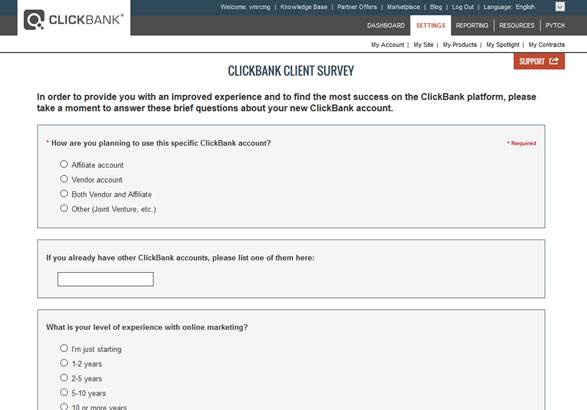
And after
the survey, you’ll see this:

You should
now have an email from Clickbank in the inbox of the email you
provided when signing up. Go to that email and click on the
link. When you do, you’ll get a confirmation note:
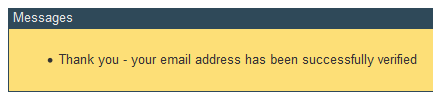
Next, click
on the “Marketplace” tab at the top (Relax! We’re not selling
anything!):

Here’s where
the action starts! This is what you’ll see next:
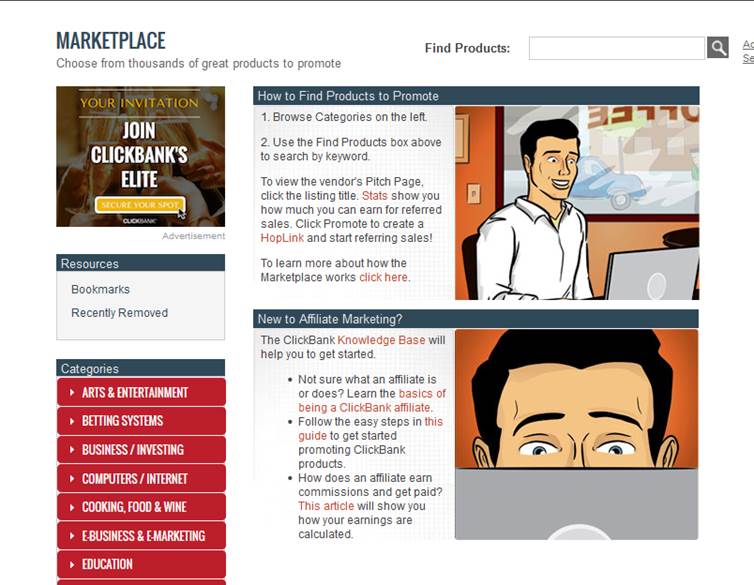
Now think of
a word that best describes where your car spends a lot of time
and the people who see it. “Golf”, or “Health”, or if you just
do regular driving, enter something EVERYONE is interested in:
“MONEY” or “HOME BUSINESS”.
I’ve chosen
“golf” in this example assuming that I work at a golf supplies
store and my car spends a lot of time in that store parking lot
and at a golf course. It’s a popular sport and growing also.
Type it into
the search bar near the top and hit “enter” on your keyboard…
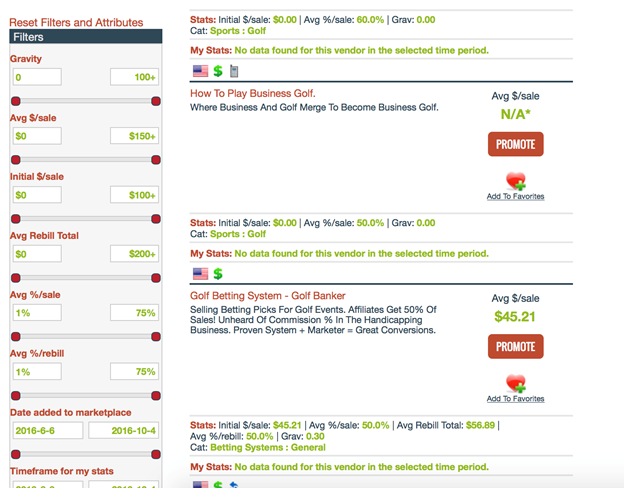
What you’re
presented with here are a selection of ‘how-to’ products for
golfers ranked by popularity (there is usually a very big
selection). Let’s click on one. I chose the “Golf Betting
System”. I chose this one because it stood out as something
“golf people” would like.
IMPORTANT
REMINDER:
I’m just
using an example here: golf. It doesn’t matter- this website has
MANY other topics. You just use the same process for every other
topic.
|
TIP: If you’re having trouble coming up with ideas
for conversation topics, you could try things a
different way. Instead of entering keywords, you can
search by category as follows…
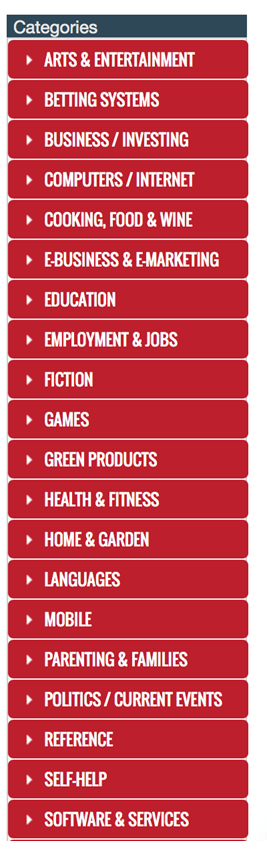
Again, click on the “marketplace” tab. Below the
search box window previously used you’ll see this
category selection menu:
 |
Okay, back
to where I clicked on that link about golf betting system. I
then saw this screen:
If any
‘pop-up’ screens appear, just close them.
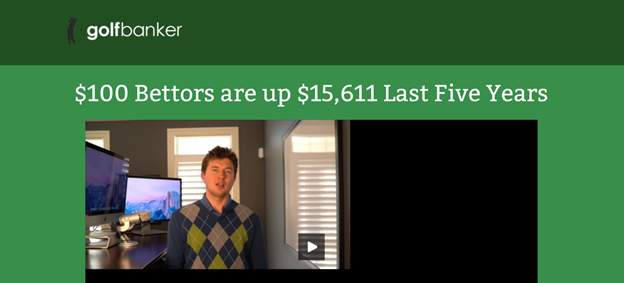
Okay, we’re
almost there. Now we get to see a headline that appeals to
people. Can you see it? Here it is…

It’s usually
easy to spot in each case; the big, bold headline at the top.
Okay, next
step…
Close that
screen with the headline and you’ll be back at the Clickbank
page. Find that link you clicked on before – the one that showed
you the Free Gas report about the golf betting system in this
example:

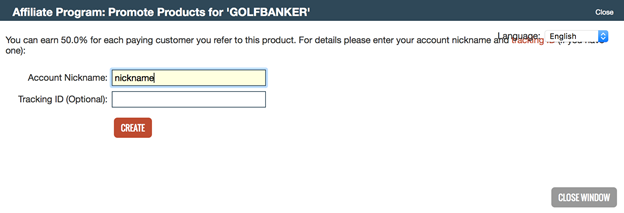
Now, at the
side of the title you’ll see the red button titled: “Promote”.
Click on it…
On the next
screen simply enter your account nickname (you wrote this down
when you signed up). No need to enter the tracking id. Click on
the “create” button…
Then you’ll
see something like this (the blue part will of course be
different for you and for each set of Free Gas report you use).
Ignore the bottom part about pasting into a website.
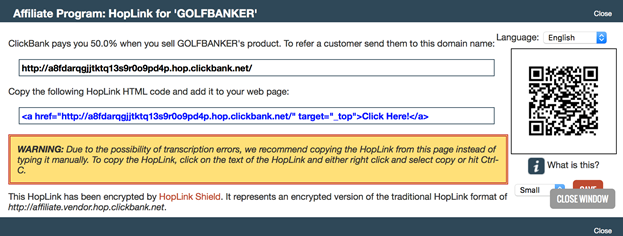
What you
want is that black line of text at the top beginning with
“http:” Not the bottom blue line, the TOP one.
Before I
explain how all this gets your gas and car expenses paid for,
let’s take a step back and review what you’ve accomplished so
far in setting this up (for really not doing much work).
You now
effectively have a sweet piggy-back ride on SOMEONE ELSE’S…
1. Website
2. Internet
Server
3. Sharp
Sales Literature (probably the greatest in the world!)
4. Product
5. Product
Inventory and delivery
6. Card
processing
7. Customer
Handling
8. Market
Research
You see,
every time someone goes to one of the ‘how-to’ websites you
selected and buys the product on offer, you get the majority of
the profits. Next thing you know, a check arrives in the mail.
So you see,
you are NOT doing any selling- someone else is taking care of
that for you (as well as all the other headaches like creating
and shipping a product etc. etc. etc.!).
You’re doing
well. Just a couple more steps…
NEXT…
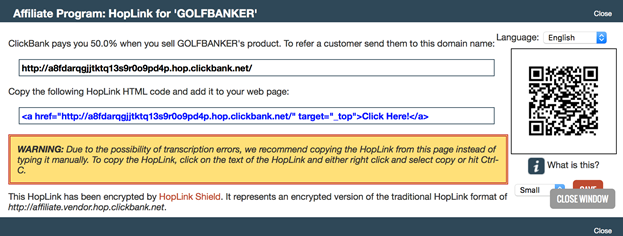
Recall back
to the black web link you obtained from Clickbank for your
chosen subject:
Now go to
this website: www.godaddy.com
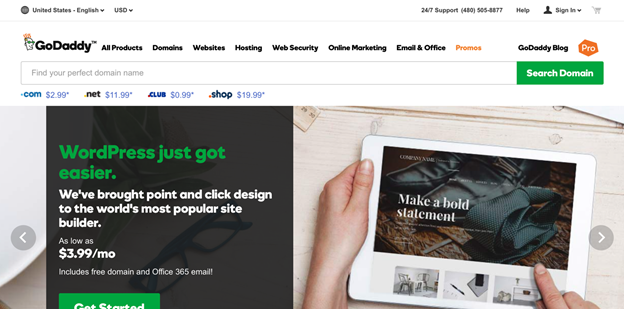
What we want
to do here is purchase a more suitable web address to have our
interested people go to (which we will then redirect to the
affiliate link). These ‘web addresses’ are known as “Domains”
And here’s how we do it…
We need to
come up with a domain name now which is appropriate for the
subject in question.
Ensure your
domain name is as closely related as possible to the topic
you’re going for, AND that it ends in “.com”. There are many
different things you can have after your chosen domain name but
we want DOT COM (.com) or maybe “.co.uk”.
For example,
if you’re going for golfers, ideally your domain name would be
something like
www.golfingtips.com
Yes, I know the domain you wanted may have been taken already,
but just use your imagination and do your best.
Another
important tip: Don’t use hyphens (-) or forward slashes
(/) to get the domain you want though (for example,
www.fly-fishingtips.com
or
www.fly-fishingtips/sea).
Another
valuable tool you can use to help you find similar words
relating to the subject is a trusty thesaurus.
So, once
you’ve got a little list of suitable domain names you could use
for this project, you enter it in this part of the page you’ve
arrived at on
www.godaddy.com

Okay, so you
then push the ‘search’ button next to it as shown, and you’ll
get this next screen come up…
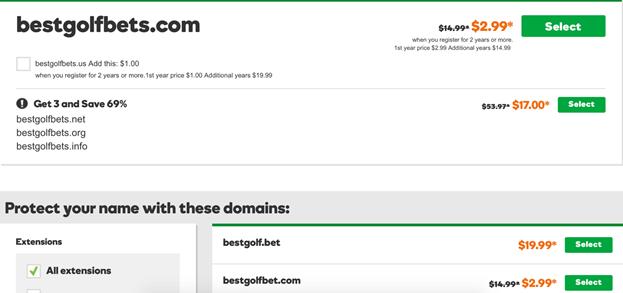
So, I can
see that the domain I wanted is available and costs something
like $14.95 per year to register and own. It’s also showing
other related domains which are available but I don’t recommend
you go for any of those as they’re not particularly memorable.
So then, if
the domain you want is available, you select it, continue on to
your cart, and purchase your domain. If any special deals pop up
from GoDaddy while you’re doing this, simply ignore them and hit
the “skip” or “no thanks” button.
Just click
on “No Thanks. Continue registration” and you’ll come to a page
that looks like this (NOTE: GoDaddy changes their pages
from time to time, so this may look slightly different when you
get to it):
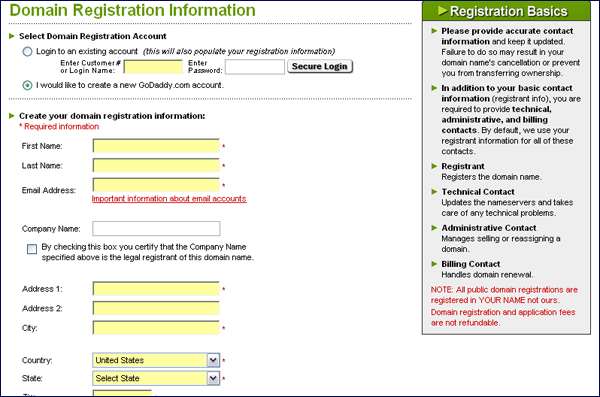
It’s all
pretty basic stuff here; just enter your details and you’re
done. You now own that domain name!
So let’s
take care of that part next…
Go back to
the first page you arrived at here (www.godaddy.com)
In the top
right corner will be a “Sign In” button. Click it.
By
purchasing a domain from them, you’ll already have the details
you’ll need to log in here. Enter them and log in. You’ll then
see at the top an option to select “My Account”.
Click on “My
Account” and you’ll then see a pop-up menu that looks like this:
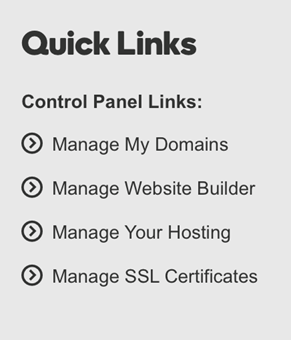
The next
button you want to locate is called “Manage Domains”. Clicking
on it will take you to this next screen…
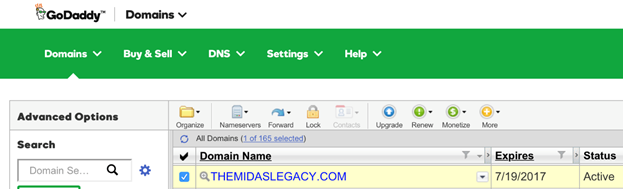
On this
screen you’ll see the domain you just purchased, plus a range of
buttons to click on. You’ll first need to select the domain you
just purchased by checking the box to the left of the domain
name. Then, click on the “Forward” button and select “Forwarding
domains”. See below for an example:
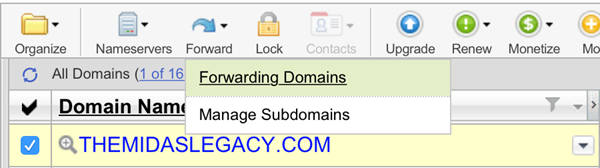
You’ll then
see this next screen…
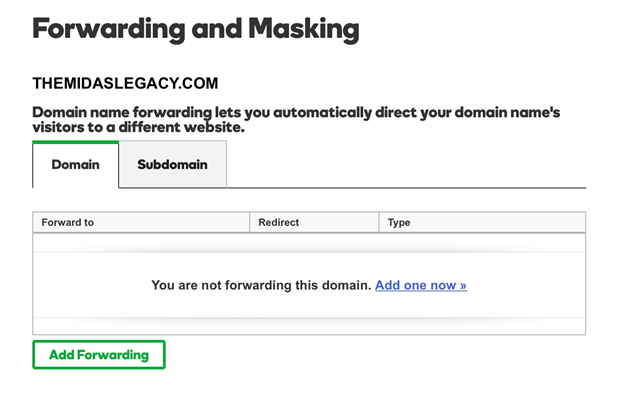
Firstly,
click the “Add one now” button in blue, which will open up this
screen:
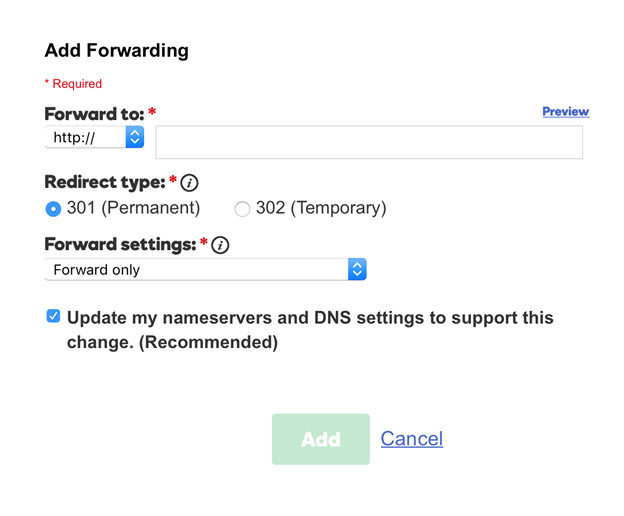
Secondly,
carefully enter your affiliate link (the long line of text
Clickbank gave you) in the “Forward to” box at the top
Thirdly,
click “Add” and then “Save” and you’re done!
Just one
last thing; type in your new domain name to your internet search
bar and ensure the redirection is actually working! If not,
recheck that you put in the right affiliate exactly.
Very good.
Believe it or not, all that will only take another 10 minutes or
so. Pretty fine; 20 minutes of messing around here and there and
a measly few dollars spent.
|
You’ve now completed the Internet part of set-up- if
you don’t want to, you never need go through this
again- it’s a one-time affair. |
Now, let’s
put it all together and make your gas bill paid for…!
How to Turn
it into ‘Free Gas’
So after
set-up, you should now be equipped with two valuable lines of
text:
1. The
headline from your chosen subject.
2. A website
address.
As a recap,
anyone who goes to that website address will see that headline
and likely buy the product it is advertising- they will take
care of everything for you; no stock or customer hassles to
worry about. Then you will be sent a check for sending that
person there.
That’s a
pretty cool thing in itself, isn’t it?!
Okay great.
So how can you take these two lines of text and turn them into
‘free gas’…?
I’ve had a
removable PVC sticker made with those two lines on and placed it
on my car rear-window! You wouldn’t believe how many people see
these things and buy stuff- I’m making hundreds regularly!
When I first
tried this out, I didn’t hold my breath. I don’t even drive
around that much. But the results have been very encouraging
indeed.
I had no
idea how much people notice these things!
Think about
free advertising for a second...
You can make
easy money by doing nothing more than driving your car and
parking it where you would anyway on a day-to-day basis!
Of course,
if you want to drive around more than usual, be my guest, but I
didn’t change my driving habits.
Alright, so
what’s the procedure? How do you get started…?
Now, it
could be that you play golf a lot and park at a golf course.
Naturally then, you’d want one of the golfing promotions
available on Clickbank then. Maybe you work at a hospital and
would benefit from one of the health promotions?
In short,
it’s common sense.
To maximize
this opportunity, you want both quantity and quality of people
to see your rear-view window.
First, let’s
look at quantity. Change your habits- park your car NOSE-IN if
you don’t already always to give maximum exposure. Park it in
the space most people will see; right by the walkway or entrance
to the building. You get the idea. Maybe those back-roads aren’t
so appealing anymore?!
Now,
quality. Whilst it may be the case that you park at a golf
course a lot or a hospital and could have well-suited niche
promotions that work, it’s worth also thinking about the broader
market. After all, the people behind you on the roads are going
to be all types.
So how can
you appeal to ALL types?
By solving a
universal problem: simple lack of, or the desire for more,
MONEY.
Take another
look at Clickbank. There are MANY excellent promotions you can
affiliate with dedicated to making money. Look at the ‘Money’
and ‘Business and Employment’ categories.
So many
promotions to choose from! How could you possibly know which one
would work best??
Answer: you
can’t. But I know someone who DOES…
… the market
itself!
The only
way, and the BEST way, is to TEST.
Choose
SEVERAL candidates, perhaps varying in target market according
to your various driving habits and destinations. Then, give each
one a FAIR test. Make a note of your odometer at the start and
end of each test. Give each promotion the same amount of mile; I
would say 50-100 miles would represent a good test and
especially, a mileage that represents your normal driving cycle.
IMPORTANT:
this is critical. If you do not give each promotion the same
amount of mileage and approximate the same destinations, the
test results will be corrupted and worthless!
Test, test
and test again. And once you’ve found a winner, go ahead and
test different free gas report for the same promotion!
So, to that
end, you want the wording on your rear-view window to be
removable. You know the sort of thing; the PVC film that sticks
to glass without glue. Be sure to get the dimensions of your
window right when speaking to the local printer/sign-maker.
You want the
MAXIMUM space available for your sign! Plus, the MAXIMUM size
lettering!.
Other
windows or panels on the car? I wouldn’t bother. Test it if you
want- with or without but I doubt you’ll see a difference.
Colors? Red
stands out. If there’s any way you can create a solid background
on the window legally (tinting etc) then do so as it will make
the letters clear.
Now, once
you have the winning formula, it’s time to expand…
By this
stage, you’ll have a good idea about how much money your ad
makes you on a given month. So, you’ll have an idea of how much
you might want to pay somebody else to drive around with your ad
on!
Especially
in tough times, what could be better than some fast and easy
cash for doing nothing but drive around like normal? When you
put it like that to them, how can they refuse? Before long,
you’ll have a local fleet of FREE advertising!
Don’t stop
testing though! Here’s to extra-happy motoring…
TroubleShooting
This system
works. Even without me saying this, by now you can at least
see how it would work once you get going.
So this
final section has tried to anticipate any issues you may
encounter that create the false impression that this doesn’t
work. If you’re not getting it to work, sorry to say this, but
it means you’re doing something wrong and you just need to
re-read this manual. As you should see by now, this really isn’t
rocket-science; it’s one of the simplest home business
opportunities you’ll ever see!
IMPORTANT
NOTE: Clickbank is not my website. Any technical/customer issues
to do with that website should be directed to them!
|
Perceived problem: |
No
applicable headlines on Clickbank for my chosen subject. |
|
Solution: |
You’re being too specific or subjective. Re-read the
section on using a category search. |
|
Perceived problem: |
No
checks arriving. |
|
Solution: |
This
could be a technical reason; check you’re sending people
to the right link. You may have mis-quoted it or have
written it down a little scruffily. Check everything is
working. If still no checks then it’s because you either
aren’t getting enough people to check out a topic or
your topics aren’t interesting enough. Please re-read
this manual, particularly the section on ‘dos’ and
‘don’ts’. |
|
Perceived problem: |
I
don’t have a computer or an accountant to keep track of
the checks. |
|
Solution: |
You
don’t need a computer and when you get checks, keep a
note of the amounts and add them to your tax return. |
|
Perceived problem: |
Some
of the Clickbank products don’t have clear headlines to
use. |
|
Solution: |
Correct. It’s not always obvious what the headline is.
In those cases, take a read through the information and
get the ‘jist’ of it. What is the single biggest benefit
they’re offering? When you know that, you’ll have the
headline. You have to apply an element of common sense
here: what you want is a BENEFIT that will be appealing
to people you know and have a conversational way of
introducing it. |
|
